





October 2, 2026
Choosing and installing a built-in desk socket
Focus: This built-in desk socket Bangladesh buying guide explains what to measure, how to check electrical safety and what to expect from USB‑C and wireless charging. If you want a ready-made option for a home office or meeting table, see the Built-in Desktop Table Socket with USB Type-C & Wireless Charger (UK plug) from Best Interior.

Why choose a built-in desk socket for a Bangladeshi desk
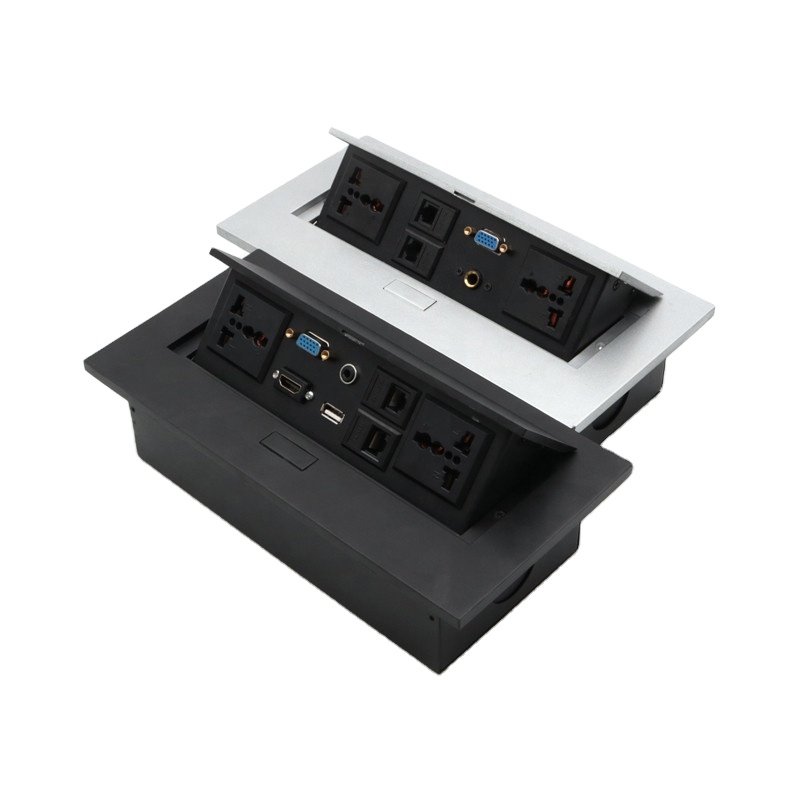
Built-in desk modules keep mains power, a USB‑C port and a Qi wireless pad in the work surface so you don’t need separate adapters or loose power strips. They reduce cable clutter, make meeting tables easier to share and deliver fast charging for phones, tablets and many modern laptops. For Bangladesh installations, choosing the UK (Type‑G) plug variant avoids adaptor problems and matches common local wiring practices.
Measure before you buy: cut-out, depth and desk thickness
Accurate measuring prevents costly mistakes. Follow these steps before cutting:
- Check the product cut‑out template. Many circular in‑desk modules fit Ø80–100 mm holes; compact rectangular units often use roughly 110–120 mm width by ~60 mm height. Always use the manufacturer template for this exact model.
- Measure installation depth. Modules vary — some need only ~44 mm, others 50–85 mm. Confirm the required clearance and add a safety margin for cables beneath the top.
- Confirm desk top thickness. Typical clamp ranges are 10–35 mm. If your desk is thicker or thinner, you may need extension brackets or a different model.
- Allow vertical clearance from drawers, rails and stiffeners. For larger modules and power leads, leave at least 150 mm of free space below the cut‑out if possible.


Electrical and safety checklist for Bangladesh
- Use the correct plug and wiring: choose the UK (Type‑G) variant for compatibility with many Bangladesh sockets and installers.
- Earthing and protective devices: built‑in mains outlets must be earthed and protected by an appropriate fuse or RCD as required by local wiring regulations (refer to the Bangladesh National Building Code and utility guidance when planning permanent wiring).
- Connection method: some modules are designed to plug into a nearby socket while others are hard‑wired to a fused spur. Decide which installation method suits your setup and ensure the protective device rating matches the module’s requirements.
- Always use a licensed electrician for final connection and any work that breaks the fixed wiring or earth continuity.
Wireless charging and USB‑C: what to expect
Qi wireless pads are convenient but have limits. The pad needs roughly 3–5 mm clearance between the phone and the module surface; thick cases, metallic cases or overlays will reduce performance. Alignment matters — most pads require the phone to sit near the centre to get full power.
USB‑C on in‑desk modules typically provides faster charging than USB‑A ports, but exact power delivery depends on the module’s internal charger and the cable. Check the product’s USB‑C power rating if you plan to charge a laptop; smaller modules may only supply phone/tablet power levels.
High‑level installation overview
- Plan location: avoid cutting over support rails, cable trays, or areas above drawers and services. Mark the final position on the desk surface.
- Dry fit: use the template on the product packaging to mark and test the cutout position before cutting the desk top.
- Cut the hole: for wood and laminate tops use the correct hole saw or router guide. Protect the underside finish if required.
- Fit the module: secure with supplied clamps or brackets and check the slide cover operates smoothly.
- Connect power: have a qualified electrician make the final connection — either plug‑in to a nearby outlet using the correct plug variant or hard‑wire to a fused spur with earthing and RCD protection.
- Test and label: verify sockets, USB‑C output and the wireless pad. Label any hard‑wired circuit for future maintenance.
Common pitfalls and how to avoid them
- Too close to the desk edge: keep at least 30–40 mm from edges to preserve strength and avoid splintering.
- Metal desk tops: metal between the wireless coil and phone blocks Qi charges. Consider a recessed plastic or wooden spacer or a model designed for metal surfaces.
- Ignoring earthing: no short‑cuts — an earthed connection is essential for safety when powering metal‑shelled devices.
- Wrong clearance: insufficient space beneath the desk may pinch cables or prevent the module from seating properly.
Care, maintenance and troubleshooting
- Keep the slide cover closed when not in use to limit dust ingress.
- Inspect wiring and connections annually or if the module behaves oddly (sockets not working, USB failing, wireless intermittent).
- If wireless charging is inconsistent, test with a phone directly on the pad without a case and try re‑alignment; if issues persist, have an electrician check the power feed to the module.
Product fit: when this Best Interior built‑in socket is a good match
The Best Interior Built-in Desktop Table Socket with USB Type‑C & Wireless Charger is suitable when you want a recessed, low‑profile hub with a slide cover for a clean desk look. Key features that matter are the recessed slide cover, a USB Type‑C port for faster device charging and a Qi wireless pad for cable‑free phone charging. If you need the UK (Type‑G) plug option for local compatibility, this product supplies that variant.
Buyers installing into laminated or wooden tops and looking for a flush finish will find the slide cover useful; if your desk is metal or very thin, check the cut‑out and depth requirements first. See the product page for exact cut‑out and installation details: Built-in Desktop Table Socket with USB Type-C & Wireless Charger.
Frequently asked questions
Does a built‑in desk socket need earthing?
Yes. Any mains socket must be earthed according to local wiring rules. A licensed electrician should connect and verify earthing continuity.
Will my phone charge through a protective case?
Thin plastic or silicone cases usually work; very thick cases, metal cases or heavy wallets can prevent Qi charging. Try without the case if charging is weak.
Can I retrofit this to an existing desk?
Yes, provided you can make the correct cut‑out, have enough depth below the top and use a qualified electrician for the power connection.
বাংলায় সংক্ষেপে
ডেস্কে বিল্ট‑ইন সকেট দিলে তারার ঝামেলা কমে। কাট‑আউট মাপ নেওয়ার সময় ডিপথ এবং ডেস্কের পুরুত্ব যাচাই করুন। ইলেকট্রিক্যাল কানেকশন পেশাদার ইলেকট্রিশিয়ানের করা উচিত। ওয়্যারলেস চার্জিংয়ের জন্য ফোন এবং কভার ঠিকমতো অ্যালাইন্ড করতে হবে।
Sources
- Desk Accessories Direct specification examples
- DesktopPower product & installation references
- Bangladesh National Building Code (reference copy)
- Belkin guidance on wireless charging and case interference
Relevant Best Interior guides: How to choose edge banding and HPL sheet buying guide for laminate desk finishes and cutout planning.